
'Hiii everyone this blog is designed for all about things releated to computers..Computer tricks,computer security,earn money online,Blogging,Seo,internet tricks,Latest technology updates..Basically a blog dedicated to computer geeks...so stay in touch to get regular updates :)

Showing posts with label amazing computer trick. Show all posts

Thursday, 26 July 2012

Hide Files or Folders Using Command Prompt


Powered by Translate

Hide Files or Folders Using Command Prompt


Trick to hide files and folders using Command Prompt
The most important thing is that, once hidden with this method, the files/folders cannot be viewed by any search options even if you click "Show All Hidden Files and Folders".
Hiding the most wanted files and folders is very important nowadays and it's really a tedious job too. In order to make this tedious job an easy one, i'm going to deliver you a the trick now.
For Example: You have a folder named "collegephotos" and this folder is stored in (Disk Drive E). You think that it should not be seen by strangers who use your PC.

For that you need to follow the following instructions

  1. Press windowkey+R: Run command dialog box appears.
  2. Now type "cmd" and hit enter. A command prompt window displays.
  3. Now type "attrib +s +h E:\collegephotos" and hit enter.
  4. The folder "collegephotos" will be hidden (Note: It cannot be viewed by any search options)

    (To view this folder again, use the same command but replace '+' with '-' on both flags 's' and 'h')

HOW TO FIND REAL IP ADDRESS OF THE WEBSITE


HOW TO FIND REAL IP ADDRESS OF THE WEBSITE


Hii Guys....

I m Back With some new interesting trick....

Here is the new trick to find the I.P. address of a website!!

Here is the Trick...

in this trick we use the ping utility  of MS dos  to determine the real Ip address of a website.Before using this utility, make sure you are not mapping a host name to some IP address with HostName Commander, because if you do, the PING utility will show the address you’ve set up with HostName Commander, instead of the “real” IP address.

To run the PING utility, click on the Windows Start button, and choose Run from the Start Menu. If you use Windows 95,98, or Me, enter “command” (without the quotes) as the command line to run. If you use Windows XP,2000, or NT, enter “cmd” (again, without the quotes). Click OK and the command prompt window should appear on the screen.

Now enter the word “ping” (without the quotes) followed by a space, followed by the host name you want to determine the IP address of, and press Enter:
In This ex. the IP address of rgpv.ac.in is 182.18.149.117.

Hope you have liked this post ....please like n comment n share THANKS....AADISH


Saturday, 24 March 2012

Locking Folders without any third party software


Locking Folders without any third party software 


Hi guys<<<<

Back with a interesting trick>>>>>>>>

There are some folders in the computer which contain some imp. information,,,,, so here is the trick to lock these folders without any software...
Consider you want to lock a folder named in your E:\, whose path is E:\.
Now open the Notepad and type the following

Thursday, 15 March 2012

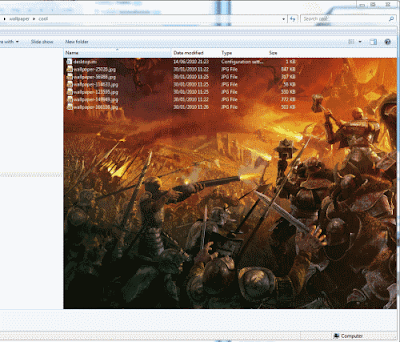
Add Background Image To Folder In Windows Explorer


Add Background Image To Folder In Windows Explorer


HII FRIENDS I M BAck with a new Trick Hope u Will enjoy this One........

Here it is....
 When you open drive or folder, You see white background.Even, if you change your theme, your window explorer background remains white and its very common.Now you can Add or Change background of any folders or Drives.
This Trick will let you add images as background of the folders or drives.It will set as wallpaper to that folder windows or drives.
Suppose we have two drive one for movies and other for songs.You can add or set background image for both drive.So when you open Movie drive,You will see movies background images and when you open songs drive, You will see album images as background.

Monday, 12 March 2012

How to detect that a keylogger is installed on a computer or not


How to detect that a keylogger is installed on a computer or not


Key loggers are software that traces the key strokes on your computer.NOW a days key loggers are mainly used for hacking.So it is IMPORTANT to protect your data from keylogger. It is done in such a way that a person using the computer is unaware of the fact that a key logger is installed on a particular PC.

How does  keyloggers enters your computer ?

There are several ways in which a key logger 

Saturday, 24 December 2011

Folder without a name

Folder without name


Hii guys here is the new trick to make a folder without name........
 DO you know how to make a folder without a name? is it possible? oh yea it is possible. just try it out..


# Click the folder, then right click on it, then click rename and delte the old name.
# Then pressing ALT button from your keyboard and type 0160 after that press enter.
Important think to notice - you have to type by holding the ALT button, don't stop pressing and while you will type 0160 it will not appear.You should continue typing and then press enter. Another important thing is that you have to type the code (0160) by your numpad. If you type the code from the upper number key it won't work. So, make sure your Numpad key is on.
Hope u will amaze your friends using this magic computer trick!!!!!
PLEASEE  FOLLOW  this blog and ADD COMMENT IF U HAV ANY PROBLEM   AADISH

 
© 2011 COMPUTER TRICKS
Designed by BlogThietKe Cooperated with Duy Pham
Released under Creative Commons 3.0 CC BY-NC 3.0
Posts RSSComments RSS
Back to top
Animated Social Gadget - Blogger And Wordpress Tips
