'Hiii everyone this blog is designed for all about things releated to computers..Computer tricks,computer security,earn money online,Blogging,Seo,internet tricks,Latest technology updates..Basically a blog dedicated to computer geeks...so stay in touch to get regular updates :)

Saturday, 24 March 2012

Locking Folders without any third party software


Locking Folders without any third party software 


Hi guys<<<<

Back with a interesting trick>>>>>>>>

There are some folders in the computer which contain some imp. information,,,,, so here is the trick to lock these folders without any software...

Consider you want to lock a folder named in your E:\, whose path is E:\.
Now open the Notepad and type the following

Thursday, 15 March 2012

Add Background Image To Folder In Windows Explorer


Add Background Image To Folder In Windows Explorer


HII FRIENDS I M BAck with a new Trick Hope u Will enjoy this One........

Here it is....
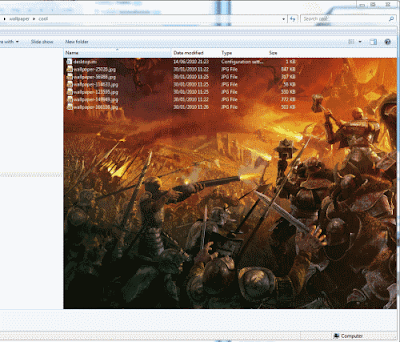
 When you open drive or folder, You see white background.Even, if you change your theme, your window explorer background remains white and its very common.Now you can Add or Change background of any folders or Drives.
This Trick will let you add images as background of the folders or drives.It will set as wallpaper to that folder windows or drives.
Suppose we have two drive one for movies and other for songs.You can add or set background image for both drive.So when you open Movie drive,You will see movies background images and when you open songs drive, You will see album images as background.

Monday, 12 March 2012

How to detect that a keylogger is installed on a computer or not


How to detect that a keylogger is installed on a computer or not


Key loggers are software that traces the key strokes on your computer.NOW a days key loggers are mainly used for hacking.So it is IMPORTANT to protect your data from keylogger. It is done in such a way that a person using the computer is unaware of the fact that a key logger is installed on a particular PC.

How does  keyloggers enters your computer ?

There are several ways in which a key logger 

Wednesday, 29 February 2012

HOW TO RECOVER YOUR HACKED EMAIL ACCOUNT

HOW TO RECOVER YOUR HACKED EMAIL ACCOUNT


Gmail

Today in this post I’ll teach you how to recover your hacked Email account. It is a big disaster if someone hacks your email account and takes control of your email account .As your email account may contain the confidential records and data like internet banking user name, password, credit card details and other sensitive data. If your email account has been hacked and you want it again, then this new trick will surely help you out. In this web trick you will find the possible ways and procedures to get back your hacked email account.
For Gmail Account:

If your Gmail account has been hacked then it would be a big disaster for you as your Gmail account may be associated with several services like “Facebook”, “Blogger”, “Analytics”,” Ad words”, “Ad sense”, “Orkut” etc. When you Lose your access to your Gmail account it means you are losing access to all the services associated with it. Now check out the following new trick to recover your Gmail:
Step -1: First of all try to reset your password. It is the easiest method to get back your Gmail account. For performing this trick Google may ask you to answer the “secret question “that you fill in the form during the creation of your Gmail account or may send the password reset details to the secondary email address associated with your hacked account. 


Saturday, 25 February 2012

INCREASE COMPUTER SPEED BY CLEANING R.A.M


CLEAN YOUR RAM BY USING THIS PC TRICKS

  
Nice one PC Trick to clean up your RAM for high processing speed. For performing this PC trick there is no need of any software .This PC Tricks is easily performed by using NOTEPAD .The PC Trick has the following steps:
1).First of all for this pc tricks create a new text file on ur desktop and Name it as "RAM cleaner" or something else.
2).Now the next step for this pc tricks is to Type the following lines in the text document.

Free Mem =Space(64000000)

Then save it as RAM cleaner .vbs [ You may choose the "All Files" option when you save it ]
3).Now you will saw a new executable  file on the screen named as RAM Cleaner. For this PC trick to perform run the file and your RAM gets cleaned up.

One more thing i want to introduce in this pc tricks is that you can edit the code in the file for a greater  cleaning-progress. For example: Freemem=Space (1280000000).

That’s all about this pc trick. For more PC Tricks continuously visit on this site.

ppLEASEE  FOLLOW  this blog and ADD COMMENT IF U HAV ANY PROBLEM                            PLEASEEEE SHARE  THIS BLOG ON FACEBOOK  / GOOGLE+        IF U LIKE IT     AADISH


Thursday, 23 February 2012

PC TRICK TO LOCK YOUR COMPUTER BY CREATING DESKTOP SHORTCUT.


PC TRICK TO LOCK YOUR COMPUTER BY CREATING DESKTOP SHORTCUT.

If you use your computer in an area where others may have access to it, and there are some confidential data  on your system and you  want that your data remain secure then apply this PC trick.Locking your desktop when you leave the PC is an essential task that task you can perform by various PC Tricks but this one PC trick is very easy to perform. The following are the step to perform this pc trick for a creation of desktop shortcut that will lock your computer in two easy clicks:


1). Right click on an empty area of the desktop and choose 'NEW' option  then 'SHORTCUT'. 

Tuesday, 21 February 2012

LOG IN in XP WITHOUT KNOWING PASSWORD


LOG IN in XP WITHOUT KNOWING PASSWORD


hey frnds. many of u know this but still 4 those who are not aware of this trick...

if u forgot password or want to log on in others computer just follow this trick....

works 100percent in xp ...don't know abt. other O.S.
the tric follows---
1) start computer
2) when it asks for password press ctrl+alt+delete keys twice
3) now another window opens asking for password.
4) in this at the place of user name just type administrator....leave the password feild blank and hit enter
5)wow u have logged in as a normal user
6) now u hav full authority only problem is that u can't open my document of the original account.
6) don't worry abt. this just use any file recovery softwere and move the files from acess denied my document to any other folder(in other drive)

enjoy


ppLEASEE  FOLLOW  this blog and ADD COMMENT IF U HAV ANY PROBLEM                            PLEASEEEE SHARE  THIS BLOG ON FACEBOOK  / GOOGLE+        IF U LIKE IT     AADISH


Monday, 20 February 2012

How to find senders IP address from received mail


How to find senders IP address from 


received mail


E-mails   are very important part of our communication system
We think that we know everything about emails
we know how to compose email , how to attach a file , how to send it to others ,How to receive emails from others and many other things.This is all we know about emails.But this is not end of it .When you receive or send emails many other things are sent with it.
At this time when Email is progressively used for business and for many purposes, not to mention it is being used for phishing and other malicious intentions. It is of utmost priority to understand the other “messages” besides what has been sent or received by you.
Every email comes with a “Header” which is one part of an e-mail structure; call it DNA of the mail. It carries the basic fundamental information such as from whom the email comes, to whom it is addressed, date/time it was sent and the subject of the email. It is similar to an electronic postSeptemberk. Moreover, it also carries other detailed information which we usually don’t see.
This basic information comes in all brief/basic headers that most email programs automatically shows. This detail technical information can be viewed in a full header. All email programs can be set to show only brief header or full header and it is up to the users to set the program whether to view only “brief header” or “full header”.
Full header carries the information of the mail server’s name that the email passed through on its way to the recipient, and sender’s IP address and even the name of the email program and its version used.
Knowledge of this information is essential for analysis and investigation purposes on cases involving email abuse, spamming, harassment, forgeries and mail-bombing. It is worth mentioning, understanding of this tool would definitely help people to counter these attacks, and save themselves from unwarranted consequences. Well, this information could not be found in a brief header.
Here we will take the case of Google mail and Yahoo mail to find out the full header.
Google Mail.
Using your id/password, login to Gmail. Open the mail for which you wish to find the full header of the sender. Click on the inverted triangle placed just next to Reply.
You will get something like this…
Delivered-To: Mr.x@gmail.com
Received: by 10.36.81.3 with SMTP id e3cs239nzb; Tue, 12 September 2007 15:11:47 -0800 (PST)
Return-Path:
Received: from mail.emailprovider.com (mail.emailprovider.com [111.111.11.111]) by mx.gmail.com with SMTP id h19si826631rnb.2007.03.12.15.11.46; Tue, 12 September 2007 15:11:47 -0800 (PST)
Message-ID: <20070312231145.62086.mail@mail.emailprovider.com>
Received: from [11.11.111.111] by mail.emailprovider.com via HTTP; Tue, 12 September 2007 15:11:45 PST
Date: Tue, 12 September 2007 15:11:45 -0800 (PST)
From: Mr.y
Subject: Hello
To: Mr.x
In the example, headers are added to the message three times:

1. When Mr.y composes the email
Date: Tue, 12 September 2007 15:11:45 -0800 (PST)
From: Mr .y
Subject: Hello
To: Mr.x
2. When the email is sent through the servers of Mr.y’s email provider, mail.emailprovider.com
Message-ID: <20070312231145.62086.mail@mail.emailprovider.com>
Received: from [11.11.111.111] by mail.emailprovider.com via HTTP; Tue, 12 September 2007 15:11:45 PST
3.When the message transfers from Mr.y ‘s email provider to Mr. x’s Gmail account
Delivered-To: Mr.x@gmail.com
Received: by 10.36.81.3 with SMTP id e3cs239nzb;Tue, 12 September 2007 15:11:47 -0800 (PST)
Return-Path: Mr.y@emailprovider.com
Received: from mail.emailprovider.com (mail.emailprovider.com [111.111.11.111]) by mx.gmail.com with SMTP id h19si826631rnb; Tue, 12 September 2007 15:11:47 -0800 (PST)
Below is a description of each section of the email header:
Delivered-To: Mr.x@gmail.com
The email address the message will be delivered to.
Received: by 10.36.81.3 with SMTP id e3cs239nzb;
Tue, 29 Mar 2005 15:11:47 -0800 (PST)
The time the message reached Gmail’s servers.
Return-Path:
The address from which the message was sent.
Received: from mail.emailprovider.com
(mail.emailprovider.com [111.111.11.111])
by mx.gmail.com with SMTP id h19si826631rnb.2005.03.29.15.11.46;
Tue, 29 Mar 2005 15:11:47 -0800 (PST)
The message was received from mail.emailprovider.com, by a Gmail server on March 29, 2005 at approximately 3 pm.
Message-ID: 20050329231145.62086.mail@mail.emailprovider.com
A unique number assigned by mail.emailprovider.com to identify the message.
Received: from [11.11.111.111] by mail.emailprovider.com via HTTP; Tue, 29 Mar 2005 15:11:45 PST
Mr.y used an email composition program to write the message, and it was then received by the email servers of mail.emailprovider.com.
Date: Tue, 29 Mar 2005 15:11:45 -0800 (PST)
From: Mr y
Subject: Hello
To: Mr.x
The date, sender, subject, and destination — Mr. Jones entered this information (except for the date) when he composed the email.
And for IP, look for Received:from followed by the IP within square brackets [ ] e.g.
Received: from [11.11.111.111] by mail.emailprovider.com via HTTP; Tue, 12
Also importantly, there are times when you might find multiple Received: from entries, in that case, please select the last one as the valid choice.

ppLEASEE  FOLLOW  this blog and ADD COMMENT IF U HAV ANY PROBLEM                            PLEASEEEE SHARE  THIS BLOG ON FACEBOOK  / GOOGLE+        IF U LIKE IT     AADISH

 
© 2011 COMPUTER TRICKS
Designed by BlogThietKe Cooperated with Duy Pham
Released under Creative Commons 3.0 CC BY-NC 3.0
Posts RSSComments RSS
Back to top
Animated Social Gadget - Blogger And Wordpress Tips